
What should an owner check before accepting a contractor's baseline schedule?
Before accepting a contractor's baseline, recalculate the native file, trace a milestone, test constraints and tie every finding to the contract.

Picture the contractor’s baseline arriving with exactly the right completion date, and the owner accepting the baseline because the date matches the contract. Six weeks later the first update shows a delay, and nobody on the owner’s side can say whether the delay comes from changed circumstances or from a defect that sat in the plan from day one, which is an uncomfortable conversation to have with a board.
The way to avoid that conversation is for the owner’s planner to check, before anything is accepted, that the schedule’s logic actually produces the dates on screen, and for the owner to tie every objection to a reason the contract recognises. A finish date that matches the contract tells you surprisingly little, because a single date constraint can hold the finish in place whatever the work behind the finish looks like. The planner and the contract administrator also need to write the response together, because under NEC4, refusing a programme for a reason the contract doesn’t list can become a compensation event, giving the contractor grounds to claim extra time and money.
What has the contractor submitted?
Before anyone looks at dates, the planner needs a version of the schedule they can recalculate. A PDF shows the plan, but the links between activities and the calendar settings that produce each date only exist in the native file, which is the schedule saved in the contractor’s own scheduling software, so a review based on a PDF can’t test how those dates were worked out.
With every baseline submission, ask the contractor for four items:
- Native file: the schedule in the scheduling software’s own format, with its revision name and data date recorded when you receive the file
- Basis of schedule: the written explanation of how the schedule was built, covering the assumptions, date constraints, lags and long durations, with a reason for each
- Narrative: the order the contractor plans to do the work in, and the path the contractor believes drives the completion date
- Owner inputs: the owner’s own commitments, such as access dates, owner-supplied equipment and approvals, shown as activities with dates
The basis of schedule is the best place to start, because the US Government Accountability Office’s Schedule Assessment Guide (GAO-16-89G) expects every baseline to come with one that explains its constraints, lags and assumptions. The owner input matters just as much, because an owner commitment that isn’t in the file has no date anyone can be held to, and you don’t want to find out at the first update that the riskiest assumption in the baseline was the owner’s own.
How do you trace one milestone end to end?
The most useful single check is to pick the contractual milestone with the most riding on it and follow the chain of activities that leads to it, back through construction, procurement and design to the data date. Following that chain shows whether the schedule’s logic genuinely delivers the milestone date, which you can’t tell from the date alone.
Along that chain, the planner is checking that:
- Every piece of work and every external dependency the milestone needs sits on the path
- Each relationship on the path, along with any lag or calendar change, has a stated reason
- Each date constraint is justified, and its effect has been tested in a copy of the file with the constraint removed
- A controlled change, such as delaying one delivery by five days, moves the milestone by the amount the logic predicts
One trace only covers part of the schedule, so what the planner finds should shape what happens next. If the first milestone turns up a missing link, the planner should trace every contractual milestone and every interface the owner controls before the owner makes a decision. If the first trace comes back clean, a second trace through a different discipline, such as the electrical work after the civils, will tell the owner more than spending longer on the same path.
Date constraints are where the problems most often hide, because a date constraint fixes an activity to a particular date and stops the activity responding to the work that comes before the activity. GAO warns that constraints can mask progress or delay and make work look more critical than the work really is, and GAO’s guidance on baselines is clear that “the baseline schedule and official status updates should not contain hard constraints.”
Float, which is the amount of time an activity can be delayed before the finish date moves, can also mislead a reviewer, because activities on the same path share their float. Five days of float showing on four activities is one five-day allowance, so a delay to any one of those activities uses up the float for all four.
Once the logic holds up, Driving Paths in Insights Pro shows the forecast critical path into the milestone, along with the near-critical paths that our forecasts suggest could take over. The planner can then extend the trace to the paths most likely to be delayed, so the review covers the work that could drive the milestone next as well as the work driving the milestone today.
What does an acceptance record look like?
An acceptance record is a short log of the revision you reviewed and each finding, with the evidence needed to close each finding and the person responsible for providing that evidence.
Take a hypothetical water-treatment project, where revision B01 shows an equipment-ready milestone at the end of working day 50, and every activity uses one five-day calendar with finish-to-start links and no lag. Equipment delivery finishes on day 35, installation takes 10 working days and the inspection takes 5.
When the owner’s planner traces the milestone, two defects turn up that hide each other on screen. Installation isn’t linked to delivery and instead follows other activities that also finish on day 35, and a hard constraint fixes the milestones to day 50. In a test copy, the planner adds the missing link and removes the constraint, and the corrected chain still finishes on day 50. The difference only shows when delivery is delayed by five working days, at which point B01 still reports to day 50 while the corrected file moves readiness to day 55.
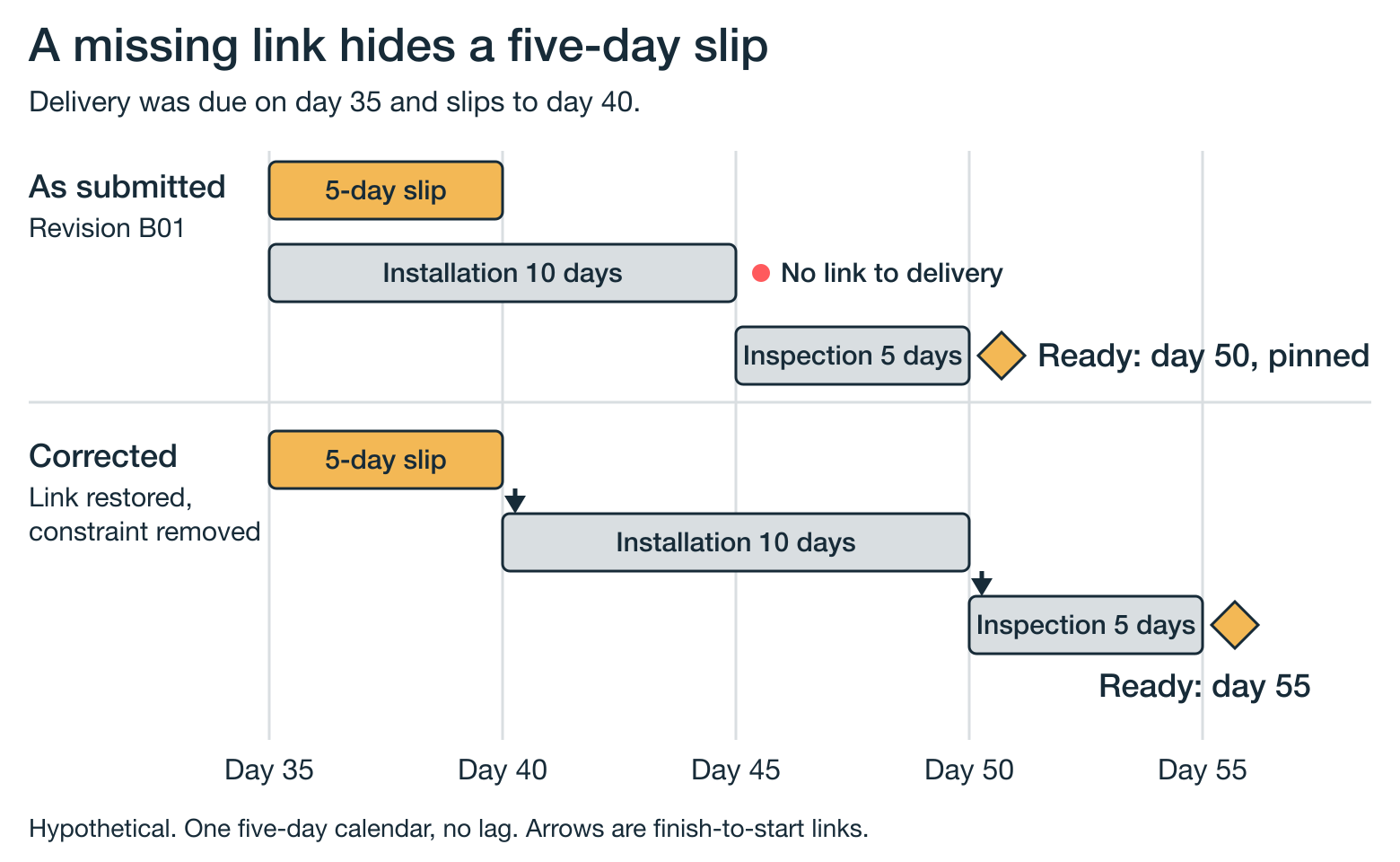
Both files show day 50 until delivery moves, and only the corrected file shows the five-day delay. Because the matching date says nothing about whether the plan is sound, the missing-link finding stays open until the resubmitted file includes the link, and the day-35 delivery remains an assumption until the supplier confirms that date.
| Finding | Evidence that closes it | Owner and status |
|---|---|---|
| Missing delivery link | Relationship restored in the resubmitted file | Contractor's planner: open |
| Milestone pinned to day 50 | Constraint removed, or justified and tested | Contractor's planner: open |
| Delivery on day 35 | Supplier commitment to that date | Contractor's procurement lead: open |
Close each finding against the replacement file only, and record the decision against that exact revision, so anyone looking back can see which version was accepted and which version was reviewed and returned.
What does the response have to rest on in the UK and the US?
A technical finding only protects the owner if the response links the finding to a reason the contract recognises. The contract administrator usually drafts the wording from the planner’s record, and the planner then checks that the wording still describes the problem accurately.
UK: NEC4 programme acceptance
Under the NEC4 Engineering and Construction Contract, the Project Manager has two weeks to either accept a programme or give reasons for not accepting the programme, as NEC’s 2025 guidance on keeping an accepted programme up to date explains. Clause 31.3 gives four reasons for not accepting a programme: the Contractor’s plans aren’t practicable, the programme doesn’t show the information the contract requires, the programme doesn’t represent the Contractor’s plans realistically, or the programme doesn’t comply with the Scope. Clause 31.2 sets out the information the programme needs to show, including access dates, key dates, the completion date and planned completion. If the Project Manager doesn’t reply, the Contractor can notify the Project Manager, and after a further week without a reply the programme is treated as accepted.
The wording of the reason matters because of how the clauses work together, as NEC’s FAQ on categorising reasons for non-acceptance explains. Clause 13.4 requires a reason without limiting what that reason can be, but refusing acceptance for a reason outside the clause 31.3 list counts as a compensation event under clause 60.1(9). The B01 findings would therefore go to the contract administrator to match each finding to the clause 31.3 reason that fits. Where the contract has amended or uses a different form, the signed terms set the route, and the owner’s record of what was tested still shows why the owner reached its decision.
US: the project specification first, with GAO as the benchmark
A US owner starts with the scheduling section of the contract’s specification, which sets what the contractor has to submit and when. Where a USACE, NAVFAC or AFCEC construction contract uses UFGS 01 32 01.00 10, Project Schedule (August 2026 edition), that section puts FAR 52.236-15 into practice. The section asks for the schedule in the software’s own format with a narrative and data date, prohibits mandatory constraints that ignore or affect the schedule’s logic, and requires the first schedule to show a reasonable and realistic sequence of work. The section also ties the End Project milestone to the contract completion date, so float shows as positive for an early finish and negative for a late one. The Government approves or disapproves each schedule, and can reject payment requests until a disapproved schedule meets the specification.
GAO’s ten best practices give the owner a useful benchmark for reviewing scope, logic, float and baseline control. GAO wrote the practices to judge how reliable a schedule is, so they only become an acceptance requirement where the contract adopts them. Under a private contract with no formal acceptance step, the owner can still review the baseline and put its findings in writing, so the first update is measured against a plan both sides have already questioned.
How do you challenge an optimistic programme with evidence?
A baseline can pass every logic check and still rely on durations that no comparable project has achieved, so the last check looks at the durations themselves. GAO recommends basing durations on the same reasoning, historical data and assumptions as the cost estimate, which gives the owner a reasonable starting point: ask the contractor to show where each driving duration on the traced path came from.
From there, compare those durations with how long similar work has taken on other projects. Bent Flyvbjerg’s 2021 overview of behavioural biases in project management, which draws on data from 2,062 projects, names neglect of base rates (ignoring how similar projects actually turned out) as a primary reason projects underperform, and a duration chosen without looking at comparable projects is an example of that bias. If the contractor can point to recorded performance on similar work, the duration stands, and if the contractor can’t, the owner has a specific finding to record.
An independent forecast gives the owner a further view of the contractor’s date. Our models are trained on more than 780,000 past project schedules, so the forecast you get from Insights Pro shows how likely the milestone is on the submitted logic, based on how past projects actually performed. When a government agency asked us in 2023 to evaluate four tenders for two highway projects, we processed each bid schedule and produced ranked risk lists that let the agency compare delivery risk between the contractors during the evaluation. The same approach works on a submitted baseline, and our guide to assessing whether a contractor’s completion date is realistic explains how to read that likelihood.
Like any other finding, a finding about optimism needs a contractual basis, so in the UK the contract administrator decides whether the findings falls under a clause 31.3 reason, while in the US the specification sets the test, such as the UFGS requirement for a reasonable and realistic sequence.
What should the acceptance decision say?
The decision should record one of the outcomes below, along with the reason for the decision and the name of the person who made the decision.
- Accept: every finding is closed in the resubmitted file, and the record names that revision
- Accept with recorded qualifications: the remaining findings fall outside the contract’s grounds for non-acceptance, where withholding acceptance would itself be a compensation event under NEC4. Each finding goes into the record with an owner and a date, and the team checks that finding again at the first update
- Return for correction: at least one finding meets a contractual ground, and the response gives that ground, the activity IDs and the evidence needed to close the finding. Under UFGS, the same finding supports disapproval, with the same evidence list
When the first update shows a delay, the acceptance record tells the team whether the delay is new or whether the problem was in the baseline from the start, which is the question the owner’s team couldn’t answer in the opening example.
Frequently asked questions
Can the contractor keep a justified constraint?
A contractor can keep a constraint that reflects a real restriction, such as a track possession or a permit window. GAO asks for any unavoidable hard constraint to be justified by an event outside the schedule and recorded in the basis document, so keep that justification in the acceptance record and check how the milestone behaves when the work leading up to the constraint is delayed.
Does passing this review mean the completion date is realistic?
Passing the review shows that the schedule calculates its dates from sound logic. Showing that a date is realistic also needs the duration challenge and a probabilistic forecast, so record those findings separately from the defects you’ve closed.
How long does the owner have to respond?
Under NEC4, the Project Manager has two weeks to accept or give reasons, and a further week after the Contractor’s notice before the programme is treated as accepted. On US projects, the contract’s scheduling specification sets when each schedule is due and how the schedule is approved. UFGS 01 32 01.00 10, for example, asks for the initial schedule within 42 calendar days of notice to proceed and doesn’t state a Government review period.
What happens to B01 once a corrected baseline is accepted?
Keep B01 with its findings and test results, and identify the accepted revision separately. Each later update is then compared with the accepted file, while the reviewed file explains why the baseline changed.
Sources:
- US Government Accountability Office, Schedule Assessment Guide: Best Practices for Project Schedules (GAO-16-89G), December 2015
- NEC Contracts, Stephen Morris, Why an up-to-date accepted programme is essential for success, 25 July 2025
- NEC Contracts, FAQ: categorising reasons for non-acceptance
- Unified Facilities Guide Specifications, UFGS 01 32 01.00 10 Project Schedule, August 2026
- Federal Acquisition Regulation 52.236-15, Schedules for Construction Contracts
- Bent Flyvbjerg, Top Ten Behavioral Biases in Project Management: An Overview, Project Management Journal 52(6), 2021
- nPlan, Using AI to evaluate tenders for a unique highways project, 2023
- nPlan, How can an owner assess whether a contractor's completion date is realistic?, November 2026
- nPlan, From AI-driven forecasting to rapid decision making: why we built Driving Paths, September 2024
- nPlan, Insights Pro: Driving Paths and Mitigation Strategies