How to turn a scope document into a schedule in under one hour
Upload scope documents, shape the WBS and milestones, and Schedule Studio builds a logic-linked first schedule in under an hour, ready to export to P6.

TLDR: For planners, schedulers and bid teams on construction, engineering and infrastructure projects: upload scope documents, describe your project, review and shape your WBS and milestones, and Schedule Studio will generate a logically linked, construction-grade schedule in less than 60 minutes. You then refine that first draft and export it to Primavera P6 or MS Project.
A scope document for a major project can run to several hundred pages, and before any real planning judgement is applied, someone has to turn it into version one of the schedule. Usually that someone is a planner, and version one has traditionally cost them a week of manual work.
Our view is that the hour matters because of where it moves the planner's effort, not because it is fast. Schedule Studio builds the first 80% of the schedule, and the five steps of the process show where your judgement goes in. The schedule you export is still yours to check and own.
Schedule Studio · Scope documents to WBS
Upload your scope document, review the phases and WBS Schedule Studio proposes, and get a logic-linked first draft you can export to P6.
Try Schedule Studio freeWhat does Schedule Studio do with a scope document?
Schedule Studio reads your scope documents and project description, proposes a work breakdown structure and milestones for you to review, then generates an editable, logic-linked schedule built on what our AI has learnt from more than 780,000 past project schedules. These are the key points of the process:
- Schedule Studio extracts information from scope documents the way a planner or scheduler would: reading the page, not just the text
- The WBS is generated from your project description and documents, and you can bring your own WBS structure if you already have one, or edit what Schedule Studio generates before the schedule is built
- Custom milestones mean the schedule reflects your actual project structure, not a fixed set of defaults
- Schedule Studio first generates a high-level schedule. From there, you can expand individual activities for more detail, or expand the whole schedule at once
- If you already have an existing schedule for a similar project, you can upload it as a reference to improve durations, sequencing and accuracy from the start
- The schedule exports directly to Primavera P6 or MS Project
Across the five steps from scope document to schedule, Schedule Studio does the work that used to fill the planner's first week, and the planner makes the decisions that make the schedule credible:
| Step | Schedule Studio does | You decide |
|---|---|---|
| 1. Upload and describe | Reads full pages and extracts project facts | Which documents, prompt and reference schedule to give it |
| 2. Shape the WBS | Proposes phases, work packages and activities | What to edit, add, remove or restructure |
| 3. Define milestones | Suggests milestones from your documents | Stage gates, handovers and contractual dates |
| 4. Generate and review | Builds a high-level, logic-linked schedule | Go or no-go, and where to expand detail |
| 5. Edit and refine | Applies your Gantt or plain-text edits | Logic, sequencing and scenarios to test |
Schedule Studio takes project scope documents and produces a logically linked, construction schedule in under 60 minutes. Here’s how it works:
- Upload your documents and describe your project
- Review and shape your WBS
- Define your milestones
- Generate and review
- Edit and refine
Step 1: Upload your documents and describe your project
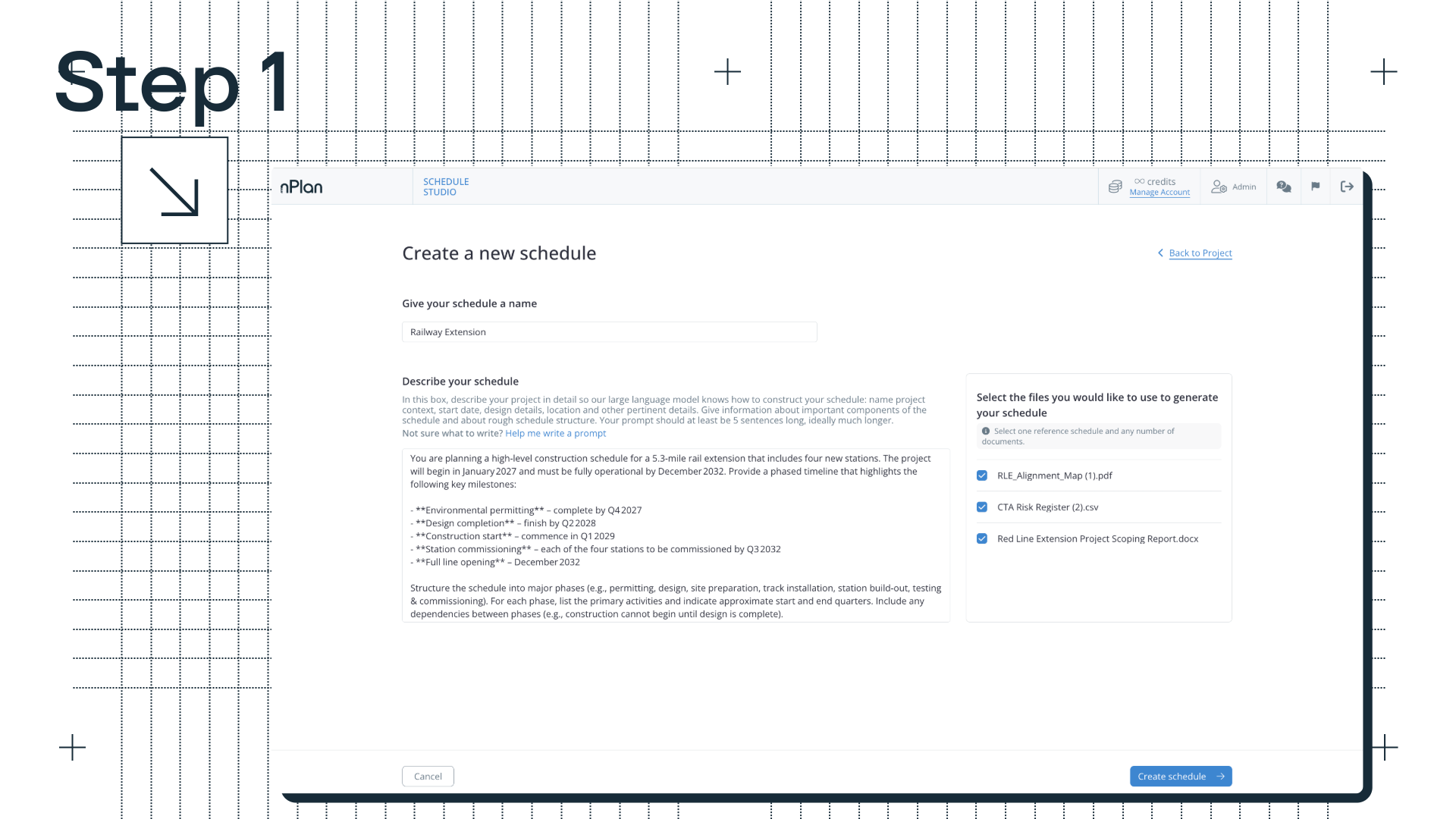
The process starts with two key inputs: your documents and your prompt.
A typical scope document for a major project can be several hundred pages long. It contains text, tables, engineering drawings, scanned images, annotated diagrams and specifications, often across dozens of different formats. Standard AI-tool document processing strips out almost everything except plain text, and that means a substantial amount of key information is lost.
Schedule Studio works differently: it doesn’t just extract words, it reads full pages. The result is a structured set of project facts: scope objectives, key constraints, milestone requirements, delivery phases, site conditions, stakeholder dependencies.
You can upload PDFs, spreadsheets, Word documents and slides, and Schedule Studio works well with scope documents, project charters and bills of quantities. Documents can take up to 45 minutes to process, which is most of the hour.
Alongside the documents, you write a project description (a prompt) that describes what the project is, where it is, any key constraints, and the milestones that matter. The combination of uploaded documents and a detailed prompt produces the most accurate output. The more context Schedule Studio has to work with, the more closely the schedule reflects the actual project.
If you already have an existing schedule for a similar project, you can upload it as a reference. Schedule Studio uses your reference schedule to inform activity durations, improve sequencing logic, and produce an output that reflects how your projects actually run, rather than relying solely on its own data.
Step 2: Review and shape your WBS
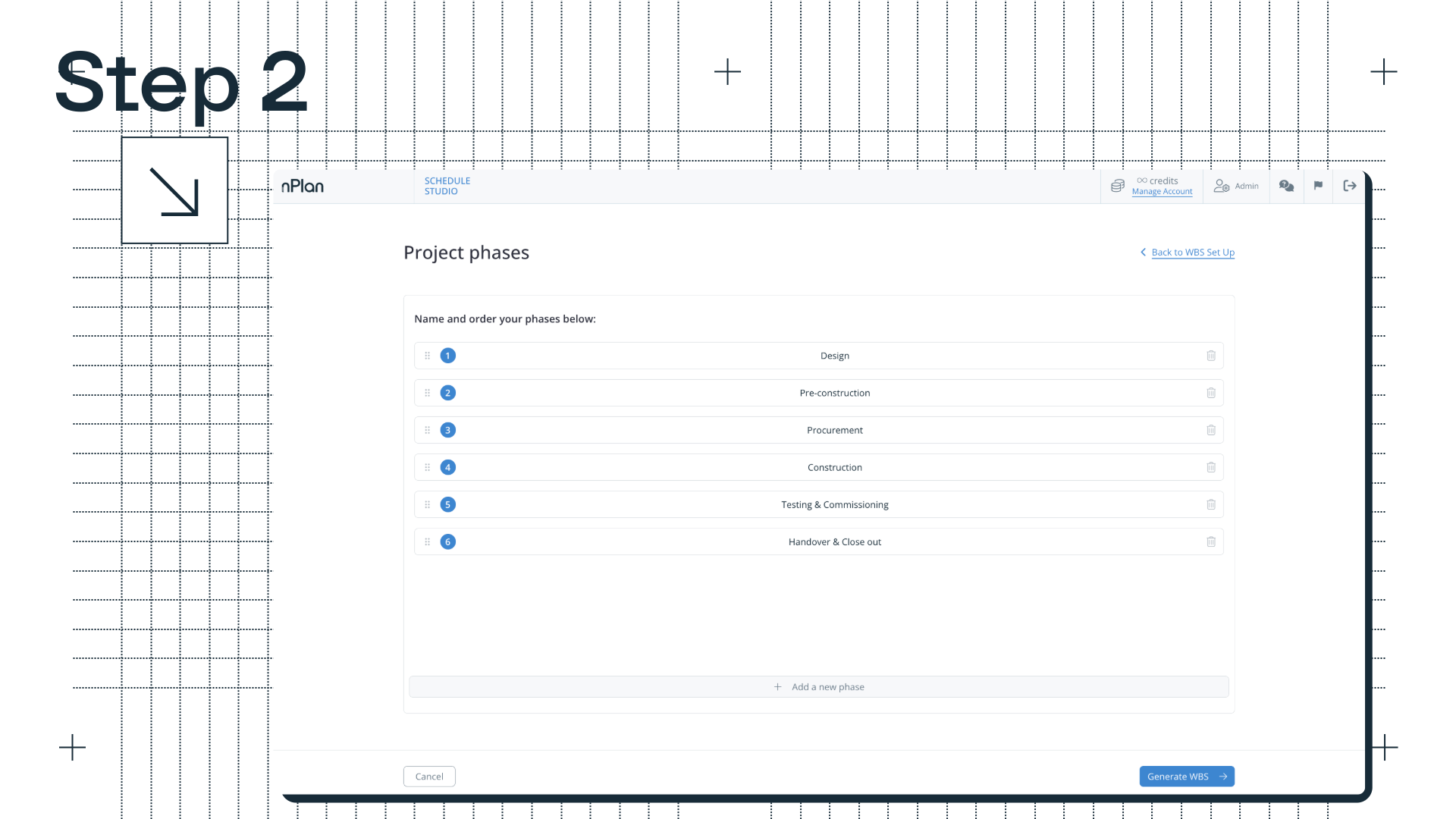
With the project facts established, Schedule Studio generates a work breakdown structure, working down the hierarchy from high-level phases to work packages to individual activities. The WBS can run to three levels of depth.
The model draws on nPlan’s huge dataset of more than 780,000 past project schedules to understand what a credible WBS looks like for the project type and sector, then applies the specific facts from your documents and description to adapt it to the actual project. A substation project has a different structure to a highway project, and an offshore wind development looks different to an urban rail scheme. That domain knowledge is built in to Schedule Studio, not improvised.
This is where you really get involved for the first time: the WBS step is a natural checkpoint, a summary of what Schedule Studio has understood about the project, and a direct opportunity to edit, add, remove or restructure before the schedule is built. Before it generates the WBS, Schedule Studio shows you how it is breaking down your scope, phase by phase, so you can correct its assumptions while they are still cheap to change.
If you already have a WBS structure you want to use, you can bring it with you. Upload your own WBS and Schedule Studio will use it as the framework for the schedule it generates, rather than building one from scratch. This is useful if you have established templates for a project type, or if the client has a specific breakdown structure that you need to follow.
Step 3: Define your milestones
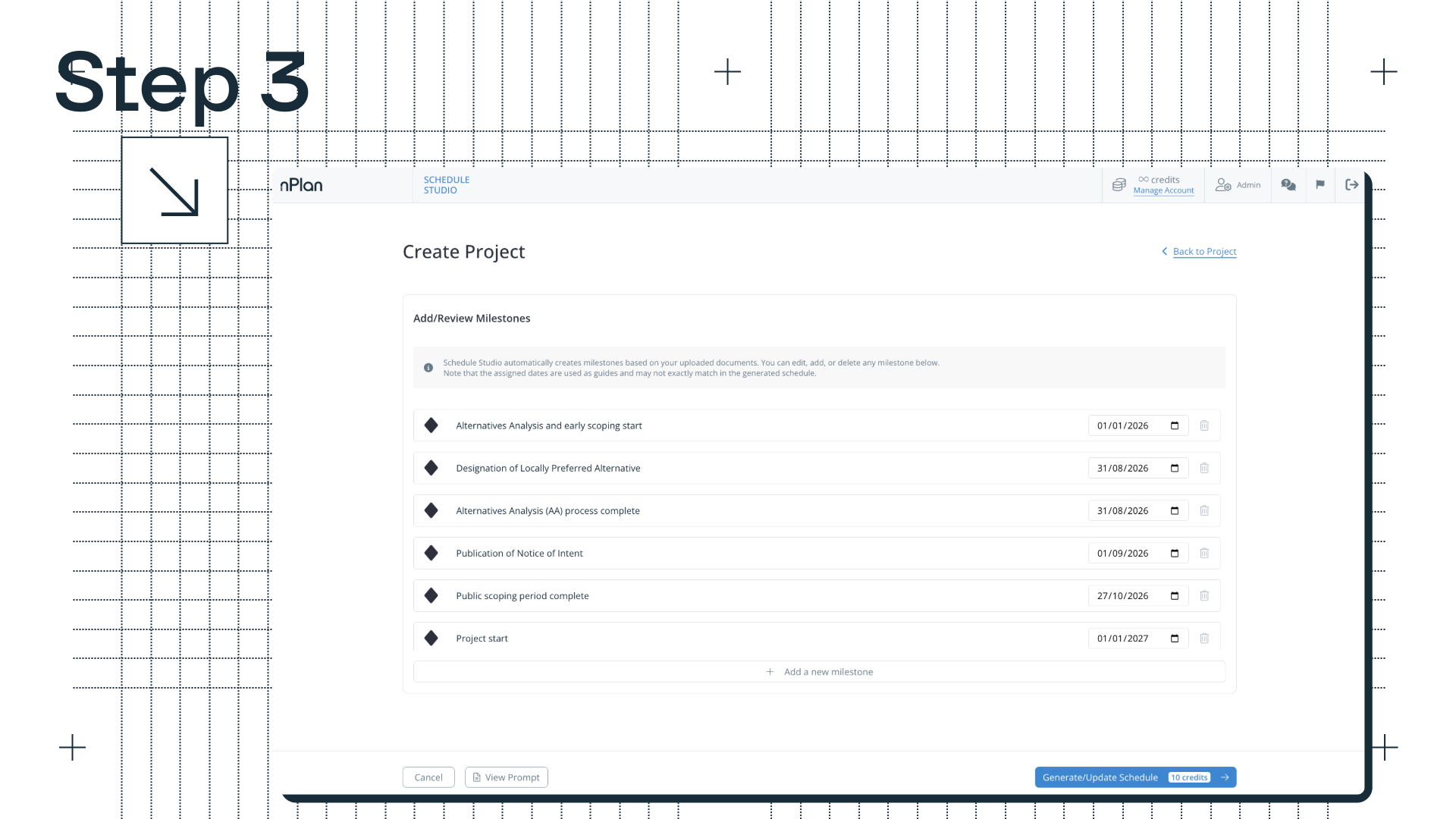
Before the schedule is generated, you confirm the key milestones. These are not fixed defaults: you can define your own to match the actual structure of your project, such as stage gates, handover points, contractual dates, or whatever the schedule needs to reflect.
Schedule Studio proposes milestones from your uploaded documents, and you can edit, add or delete any of them. The dates you assign act as guides for the generation, so check them again in the generated schedule.
Getting milestones right at this stage means the generated schedule is structured around what the project actually needs, not a generic interpretation of what a project of this type usually looks like.
Step 4: Generate and review
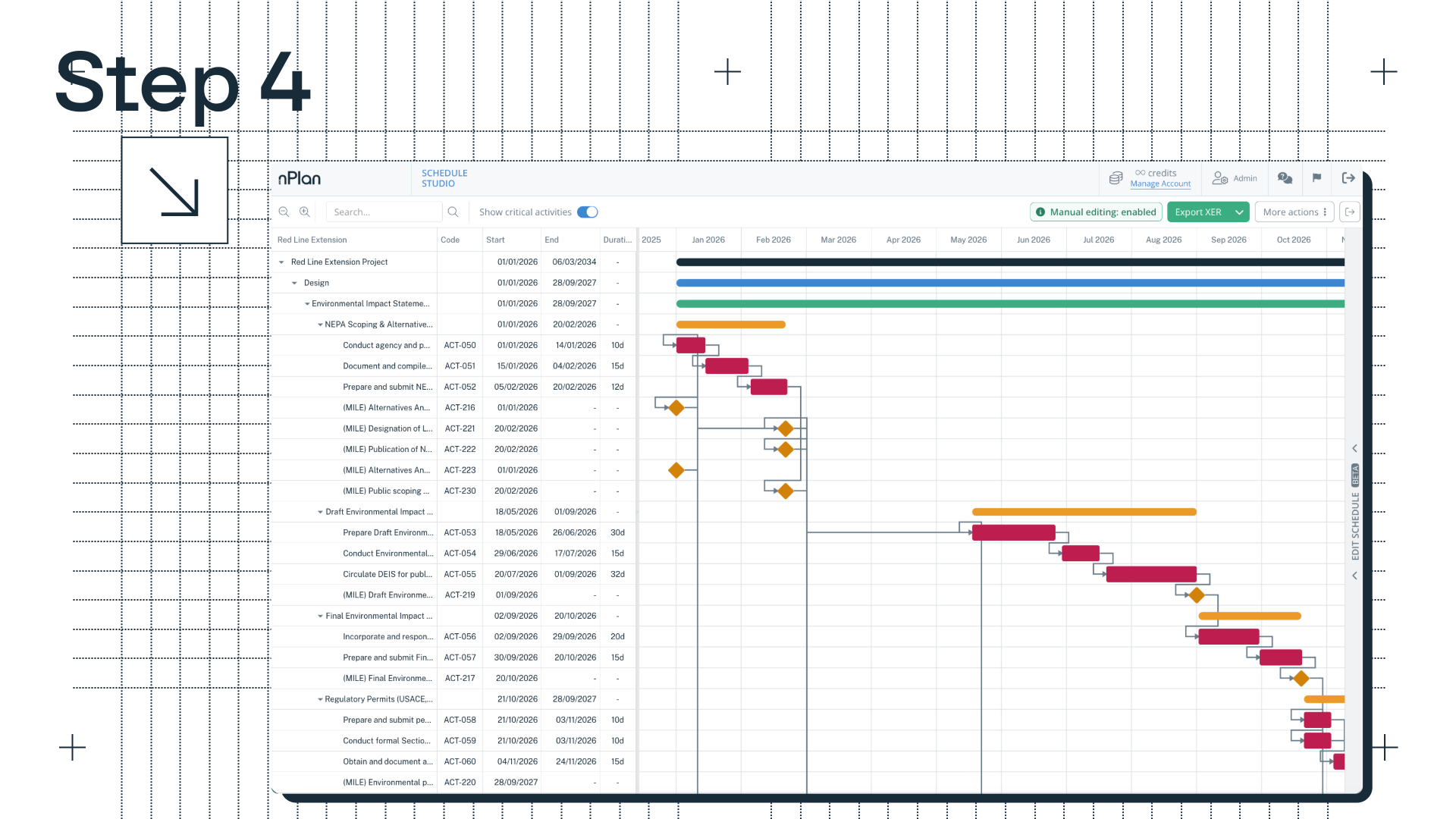
With documents uploaded, WBS shaped, and milestones confirmed, Schedule Studio generates your schedule.
The first output is a high-level schedule: phases, milestones, and top-level activities that give you an immediate read on the project’s shape and timeline. This is enough to make a go/no-go call at the early feasibility stage, or to sense-check whether the schedule is realistic before going further.
From there, you have two options. You can expand individual activities into sub-tasks, useful when you want more granularity in a specific part of the schedule, without rebuilding the whole thing. Or, you can expand the whole schedule at once, taking it from a high-level outline to a fully detailed schedule in one step. Depending on the complexity of the project, a fully expanded schedule can hold thousands of activities.
Step 5: Edit and refine
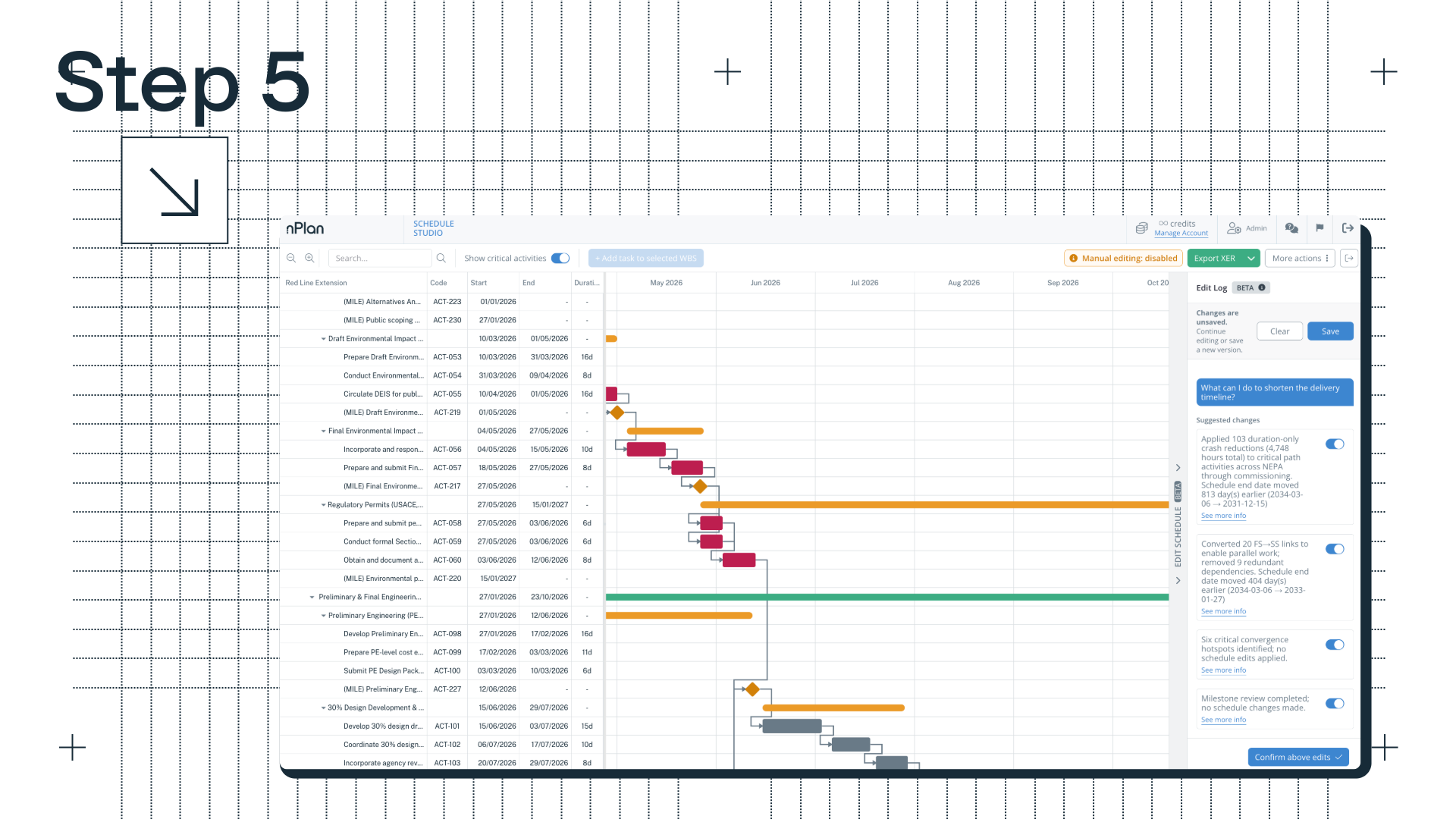
The generated schedule is the first 80%. The rest is yours to refine: tweaking the logic, adjusting the sequencing, making it work exactly the way your project needs to run.
There are two ways to do this. You can edit individual activities directly on the Gantt: adjust names, durations, labour hours, and dependencies. Or, you can describe changes in plain text and let Schedule Studio apply them, which is particularly useful for broader structural changes like resequencing a section, parallelising activities, or adding a new work package. Plain-text editing is currently in beta.
If you want to explore a different delivery scenario without touching your current schedule, you can use the Iterate feature to create a named variation. You can go back and edit the prompt, the WBS or the milestones.
Once the schedule is in Schedule Studio, paid users can also connect it to Claude or ChatGPT to ask questions about it, such as what is driving a handover milestone, with every answer coming from Schedule Studio itself.
What you get
When the schedule is ready, it exports directly to Primavera P6 as an XER file, or to MS Project as an XML file. Schedule Studio produces the starting point, and then you finish it the way you want to (in a fraction of the time it’d usually take).
The export keeps your logic, durations and structure, so you can carry on in P6 adding cost and resource detail or integrating the schedule with existing project data.
The expertise still belongs to you, Schedule Studio just gets you to the point where that expertise can actually be applied, without the week of manual work that used to come before it.
What should you check before the draft becomes your programme or schedule?
Check the draft against the standard your contract or client will hold it to, because a generated schedule covers the structure, logic and durations but not every requirement of a submitted programme. Resources are the clearest gap: Schedule Studio does not currently create resource-loaded schedules, so crews, plant and equipment are added by the planner after export. The checks differ between the UK and the US.
In the UK: check it against NEC4 clause 31.2
On an NEC4 Engineering and Construction Contract, clause 31.2 lists what every programme issued for acceptance must show (NEC4 Engineering and Construction Contract, clause 31.2). That includes the starting date, access dates, Key Dates and Completion Date, planned Completion, the order and timing of operations, provisions for float and time risk allowances, the dates when the contractor needs access, acceptances, client-supplied plant and materials and information from others, and a statement of the principal equipment and resources it will use.
The generated draft gives you the order and timing of operations and the milestones you confirmed in step 3. Float, time risk allowances, access and information dates and the resource statement are the items to add and check before the programme goes to the Project Manager for acceptance.
In the US: check it against GAO's best practices and your schedule clause
The US Government Accountability Office sets out ten best practices for a reliable schedule. The first says the schedule should reflect all activities in the work breakdown structure, "including activities both the owner and the contractors are to perform", and the third says it should reflect the resources needed to do the work (GAO-16-89G Schedule Assessment Guide). Owner activities such as design reviews and permits, and the resource loading, are the two areas to check first in a generated draft.
Where a federal construction contract includes FAR 52.236-15, it requires a practicable schedule within five days after work starts, unless the contracting officer sets another period, showing the order of work and the start and completion dates of its salient features, including acquiring materials, plant and equipment (FAR 52.236-15). Procurement activities in the generated WBS are where those dates come from, so confirm them against real supplier lead times.
When is a generated first draft not the right starting point?
A generated draft helps most when the scope is written down and the team needs a credible structure quickly: bid schedules, feasibility and early-stage planning, and projects in a sector the team has not scheduled before. Schedule Studio works for construction, engineering and infrastructure projects, from energy and transport schemes to data centres, utilities and water.
It helps least when the scope lives outside the documents. Schedule Studio builds from what you give it, so a requirement agreed in last week's clarification will not appear unless you add it to the prompt or the WBS. And if the job needs a resource-loaded schedule from the start, plan for that work in P6 after export. Our article on who Schedule Studio helps, and how covers the main uses for contractors, owner-operators and consultants, and why AI couldn't build construction schedules before explains the technology underneath.
How should you spend the hour?
Spend it at the checkpoints. Give Schedule Studio your full scope documents, a detailed prompt and, if you have one, a reference schedule; challenge the WBS and milestones before generation; then use the time you have saved on logic, sequencing and the NEC4 or FAR and GAO checks. That is the work we built Schedule Studio to give back to planners. Once the schedule is accepted, Insights Pro can forecast how likely its key milestones are.
Schedule Studio is available now. Try it for free here, or get in touch with our team to find out more.
Schedule Studio · Reference schedules and P6 export
Upload a schedule from a similar past project so durations and sequencing start from how your projects run, then export the draft to P6 to finish it.
Book a callFrequently asked questions
How long does it take to turn a scope document into a schedule with Schedule Studio?
Schedule Studio produces a logically linked, construction-grade schedule from scope documents in under 60 minutes. Document processing can take up to 45 minutes of that. Reviewing and refining the draft afterwards is planner time on top, and it is where the schedule becomes credible.
What documents can Schedule Studio read?
Schedule Studio works well with scope documents, project charters and bills of quantities, in PDF, spreadsheet, Word and slide formats. It reads full pages, including tables, drawings and scanned images, rather than plain text alone.
How detailed is the generated schedule?
The WBS can run to three levels of depth, and a fully expanded schedule can hold thousands of activities, depending on the complexity of the project. Schedule Studio starts with a high-level schedule, which you can expand activity by activity or all at once.
Can Schedule Studio create a resource-loaded schedule?
Not currently. You can edit labour hours on activities, but crews, plant and equipment are added after export, for example in Primavera P6, and any resource statement your contract requires stays with the planning team.
Can I export the schedule to Primavera P6 or Microsoft Project?
Yes. Schedule Studio exports to Primavera P6 as an XER file and to MS Project as an XML file, keeping the logic, durations and structure.
Does Schedule Studio replace the planner?
No. Schedule Studio produces a credible first draft, about the first 80% of the schedule. The planner decides the WBS, milestones, logic and sequencing, and checks the result against the contract before anyone relies on it.
Sources
- nPlan, Schedule Studio product page and FAQ
- nPlan, We built a link from Schedule Studio to Claude and ChatGPT, October 2026
- nPlan, Who Schedule Studio helps, and how
- nPlan, Why we built Schedule Studio
- US Government Accountability Office, Schedule Assessment Guide: Best Practices for Project Schedules (GAO-16-89G), December 2015
- Federal Acquisition Regulation 52.236-15, Schedules for Construction Contracts
- NEC, NEC4 Engineering and Construction Contract
- ECC clause 31.2 programme requirements, summarised by GMH Planning
.png)