How should an owner validate an AI forecast when schedule data is poor?
Validate an AI forecast on poor schedule data against the decision it supports: check the input, record what findings rest on, then accept, limit or reject it.
Written by
Stacey Gray
Believes the world's biggest projects deserve better than guesswork. Powered by customer stories, products that solve real problems, and the occasional gelato.
Updated 10 November 2026
Key takeaways: For owners and assurance leads reviewing a forecast built on an incomplete or out-of-date schedule, validate it against the decision it has to support. Record the schedule's source, version and status date, the missing interfaces and what the main findings rest on, then mark the forecast usable, usable with limits or not usable for that decision.
The monthly update has arrived with no status date set in the file and the owner's own access and connection works missing from the schedule, and the steering group still wants to know by Friday whether the commissioning milestone needs intervention. The question that gets the team to Friday is whether this input is good enough for this decision, and the team can answer it in writing.
Poor schedule data is a reason to narrow what a forecast is used for. Waiting for a clean schedule leaves the owner without an independent view of the milestone until the data improves, while a forecast read with its limits on the record gives that view this month. The floor is a schedule that cannot calculate a date at all, or one with no status date, whose dates cannot be trusted: no forecast can rescue either, and the record should say so plainly.
Insights Pro · Driving Paths
See which paths drive your milestone forecast, so the team can take each finding to the people who run that work before the steering group meets.
How should an owner validate an AI forecast when the construction schedule data is poor?
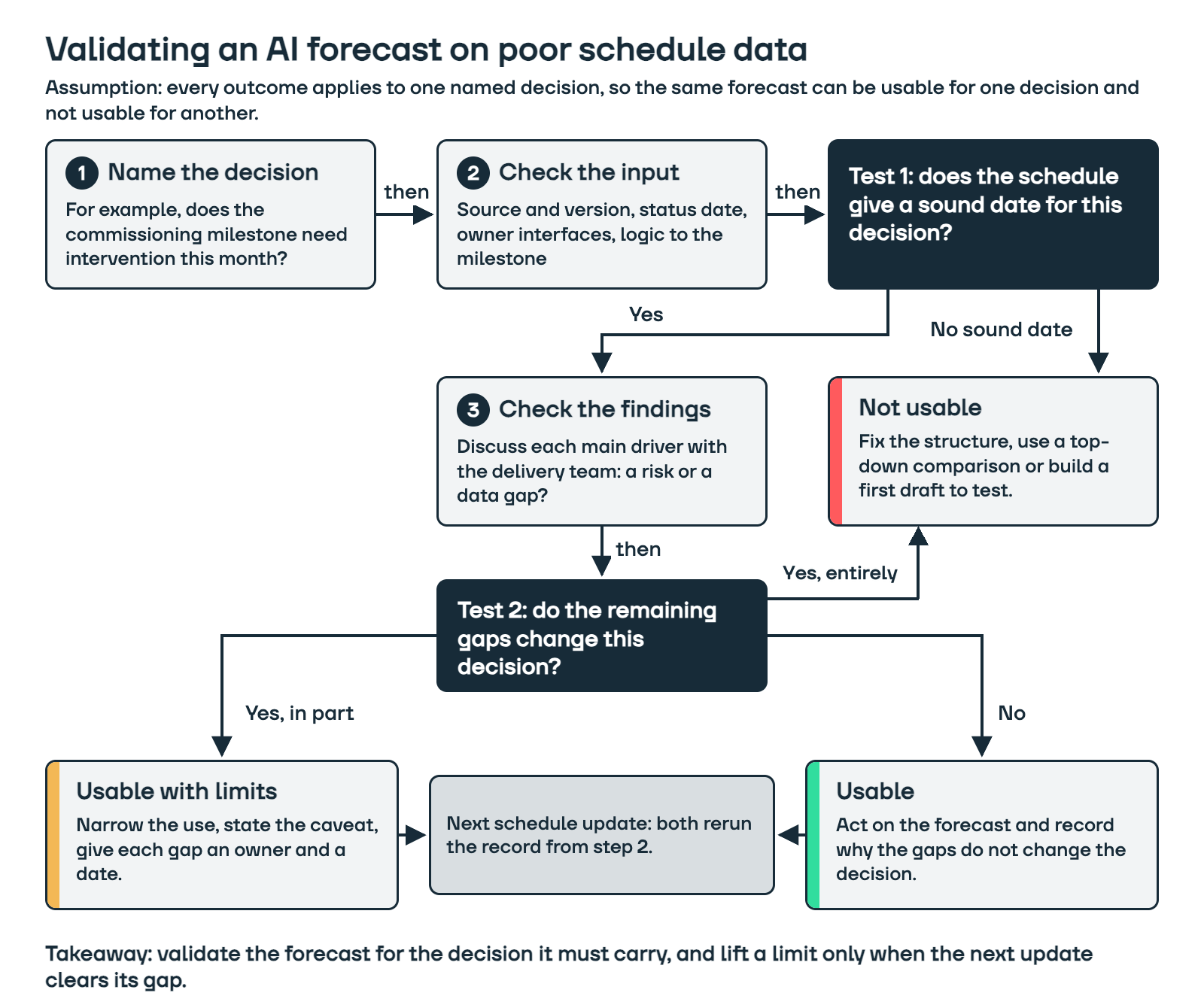
Validate the forecast against the decision it has to support. Name that decision first, for example whether a commissioning milestone needs intervention this month, then check the schedule, its gaps and the forecast's main findings against what that one decision needs, and record the result as usable, usable with limits or not usable.
This follows how validation is defined well beyond construction. The AI Risk Management Framework from the US National Institute of Standards and Technology (NIST AI 100-1, January 2023) uses the ISO 9000 definition: validation is the "confirmation, through the provision of objective evidence, that the requirements for a specific intended use or application have been fulfilled". A forecast can meet the requirements of one use and fall short of another on the same schedule, which is why the decision comes first.
What should you check in the schedule before you read the forecast?
Check four things about the input before anyone reads the forecast: where the schedule came from, its status date, whether the work the decision depends on is in it, and whether the logic to the milestone is complete. Each can be confirmed quickly, and each can change what the forecast means.
Source and version: Record who supplied the file, which update it belongs to and whether it is the native schedule file (Primavera P6, Asta Powerproject or Microsoft Project) or an export. A PDF or a summary export has lost the logic a forecast reads.
Status date: Confirm that the status date is set in the file itself. The US Government Accountability Office's Schedule Assessment Guide (GAO-16-89G) states that "unless a status date is provided, the schedule cannot be used to reliably convey past and remaining effort", and that neither the date someone views the schedule nor its save date is a substitute.
Owner interfaces: Trace the scope the decision needs against the schedule: the owner's own works, access dates, owner-supplied equipment, connections and third-party approvals. GAO expects a schedule to cover the work "regardless of who performs it", and warns that "if activities are missing from the schedule, then other best practices will not be met." A scope trace is the check that finds missing work, and it matters here because the owner's own works, access dates and supplies appear in the schedule only when someone adds them.
Logic to the milestone: Run a logic and sequencing check for open ends and unlinked activities on the paths to the milestone. Dangling logic lets a date float free of the work that should drive it, and GAO's guidance is that "all dangling logic should be corrected".
What does an acceptance matrix for a poor-quality schedule look like?
An acceptance matrix lists each check with the evidence that clears it and the person who reviews it, and each gap then takes one of three outcomes for the named decision. The limit it leaves is written beside the gap in the record, which fits on one page and travels with the forecast wherever it is quoted.
Acceptance matrix: the checks and who reviews them (example rows)
Check
Evidence that clears it
Reviewer
Source and version
Native file from the contractor's planner, with its update reference recorded
Owner's project controls lead
Status date
Data date set in the file and confirmed by the contractor
Owner's project controls lead
Owner interfaces
Every access, supply and approval date in the decision's scope traced to an activity
Owner's interface manager
Logic to the milestone
No open ends or unlinked activities on the paths to the milestone
Planner
Main forecast findings
Each top driver discussed with the delivery team and marked as a risk or a data gap
Delivery manager
Acceptance matrix: the three outcomes for one named decision
Outcome
What it means
What the owner does next
Usable
The gaps found do not change this decision
Act on the forecast and record why
Usable with limits
The gaps affect part of this decision
Narrow the use, state the caveat, give each gap an owner and a date
Not usable
No date can be calculated, or the gaps leave this decision without a sound basis
Fix the structure or use other evidence for this decision
Take an illustrative update, made up for this example. The schedule holds 2,400 activities and the decision is whether to intervene on a commissioning milestone this month. The status date was missing from the file, so the owner's project controls lead asked the contractor's planner to confirm it, which happened the same day, and the forecast was run again on the corrected file. The scope trace then found 22 of the 31 owner interfaces in the decision's scope in the schedule, leaving 9 missing. Of the 10 activities that drive the milestone forecast most, 3 sit next to one of those missing interfaces, so they may describe the gap more than the work, while the other 7 touch none of them.
For that update, the forecast is usable with limits for choosing which of the 7 drivers to challenge with the contractor this month, and not usable for a revised commissioning date for the board until the 9 interfaces are in the schedule. The 3 drivers next to missing interfaces are held as data gaps, owned by the interface manager and due before the next update.
A schedule that gives no sound date for the decision stops at the first test; usable and usable with limits both rerun from the input checks at the next update.
How do you check what the forecast's findings rest on?
Take the forecast's main findings to the people who run the work and ask, for each one, whether it describes the project or a gap in the schedule. A driver that sits beside a missing interface or an open end may be the forecast reading a hole in the network, so it goes back on the matrix as a data gap with an owner and a date. If the delivery team can confirm that a driver represents a real project risk, agree what to do about it. If the finding is still unexplained, assign someone to validate it before using it to make a decision.
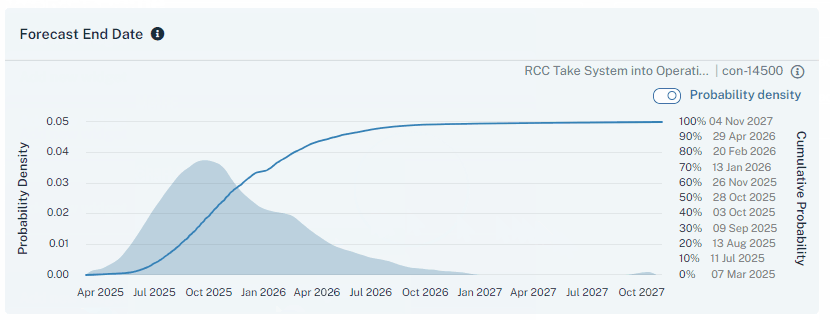
An Insights Pro forecast on nPlan's demonstration data: the spread of likely completion dates that the acceptance record qualifies for one decision.
Insights Pro supports this step. We forecast every activity in the schedule using what our models have learnt from more than 780,000 past project schedules, explain what is driving each milestone forecast and show the driving paths most likely to slip and affect it, so the team can see which findings depend on which parts of the network. Because we forecast at activity level, our models do not need a near-identical past project to learn from, which helps when the project is unusual. Our team works alongside yours through the first forecasts, and your planners and risk team stay in control of the findings and the acceptance decision.
The LNG Canada project team, where we supported the construction phase, described how the forecast shapes their conversations in these words: "Using data from thousands of other projects helps highlight areas we (as a project team) may have overlooked and allows us to focus our conversations on the areas that could have the biggest impact."
What should change when the next schedule update arrives?
Run the same record again on the next update and compare it with the last one. A limit lifts only when its gap is cleared: a missing interface that is now in the schedule moves its rows from data gap to tested, and an interface still under discussion keeps the limit in place. If the milestone forecast moved, the record shows whether the work changed or only the schedule did.
Insights Pro compares the schedule between updates, which lets the team see what changed in the input beside what changed in the forecast. NIST's framework describes the same discipline for AI systems in general, noting that validity and reliability for deployed systems "are often assessed by ongoing testing or monitoring that confirms a system is performing as intended".
How should you evaluate an AI schedule forecasting tool before rolling it out across live projects?
Evaluate it on two or three live projects through at least two schedule updates each, using the same acceptance record on every one, and extend it only once the records show that findings held up with the delivery teams and that limits lifted as gaps closed. Include a project whose schedule data is poor on purpose, because that is where you learn how the tool and your teams handle limits.
Ask these questions of the tool and of your own process during the evaluation:
Can it read the schedules your contractors already send, in the formats they already use, without a rebuild?
Can your team see what each finding rests on, and record a finding as a data gap?
Does the forecast show what changed between updates in terms the delivery team can check?
Who supports your team through the first forecasts, and who owns the acceptance decision afterwards?
Has your security team confirmed the provider's data handling before the first schedule is uploaded?
When is schedule data too poor for a forecast?
Schedule data is too poor for a forecast when the schedule cannot calculate a date for the milestone, for example from a summary bar chart or a network with no logic on the path to it. A file with no status date can still calculate dates, but it cannot reliably separate work done from work remaining, so its dates cannot be trusted. Until the logic is fixed or the status date confirmed, the record marks the input not usable for this decision and the owner takes another route:
Ask for the structure to be fixed first, with the logic and status date the checks found missing, and set a date for the resubmission. We cover reviewing a contractor's baseline before accepting it in our guide to contractor completion dates.
Where the owner needs a schedule to test, build a logic-linked first draft in Schedule Studio and have planners refine it before it carries any decision, as in turning a scope document into a schedule.
Where a contract prescribes a quantitative schedule risk analysis (QSRA), the prescribed analysis still runs and the forecast informs the review. Where it does not, AI-led schedule risk analysis (AI-SRA) is an alternative to traditional QSRA, and the project team still validates the outputs and makes the acceptance decision. We compare these approaches in more depth in our posts on traditional risk software and on schedule analytics.
How does this work in Great Britain and the United States?
Both markets judge data by whether it is fit for the use it is put to, while the official sources and contract routes an owner can lean on differ.
How should an owner in Great Britain validate a forecast on poor schedule data?
In Great Britain, judge the schedule against the Government Data Quality Framework's test of fitness for purpose, and use the NEC4 programme requirements to find the owner's own interfaces. The framework, published by the Government Data Quality Hub in December 2020, describes data quality as fitness for purpose and names six dimensions. Two map straight onto the checks above: completeness, "the degree to which records are present", and timeliness, "the degree to which the data is an accurate reflection of the period that they represent". The status date identifies that period. The team still needs to check that reported progress is current and accurate.
Under the NEC4 Engineering and Construction Contract, clause 31.2 lists what a programme submitted for acceptance shows, including the dates when the Contractor will need access to parts of the site, acceptances, Plant and Materials provided by the Client and information from others (GMH Planning's guidance note sets out the full list). Those entries are the owner's interfaces, so a missing one is a gap in the owner's evidence as well as the contractor's. We cover programme acceptance itself in our guide to contractor completion dates.
How should an owner in the United States validate a forecast on poor schedule data?
In the United States, GAO's data reliability guidance gives owners a ready vocabulary for the outcome. Assessing Data Reliability (GAO-20-283G, December 2019) makes each assessment "in the broader context of the audit's purpose and the risk associated with using insufficiently reliable data", and allows three determinations: sufficiently reliable, not sufficiently reliable and undetermined reliability. Where issues could lead to an incorrect message, it allows "at least limited use" through measures that include "changing the planned use of the data" and adding caveats, which is the usable with limits outcome in the matrix. An undetermined row stays open with an owner and a date.
Where a US federal construction contract includes FAR 52.236-15, the clause requires the contractor to submit "a practicable schedule" for the Contracting Officer's approval and to enter actual progress on it as directed. That gives a federal owner a contractual route to a statused update before a forecast carries a decision.
What should the owner take to the next steering meeting?
Take a one-page acceptance record: the decision named, the schedule's source, version and status date, the gaps with their owners and dates, the forecast's main findings marked as risks or data gaps, the outcome for that decision and the date of the next rerun. With that page on the table, the steering group can act on what the forecast supports this month and see what it is still waiting for. Whether this schedule could carry this decision was what the steering group needed by Friday, and the record answers it.
Insights Pro · Schedule comparison
Bring your next schedule update and the decision it has to support, and see how the forecast and its drivers change from one update to the next.
What is the minimum schedule data needed before an AI forecast is worth running?
A native schedule file with a status date, and logic that lets the schedule calculate a date for the milestone in question. Gaps beyond that limit what the forecast can be used for, and the acceptance record states those limits.
Is a schedule quality review still needed when a forecast is run?
Yes. A schedule quality review checks how the schedule is built, while the forecast reads that schedule to estimate how the work is likely to perform. The quality review supplies the input checks in the acceptance record, and the forecast supplies the findings the team then validates.
Who should sign off the acceptance record?
The owner's accountable lead for the decision, such as the programme director or assurance lead, once the project controls lead, interface manager and delivery manager have reviewed their rows. Planners confirm what the schedule shows; the owner decides whether the remaining gaps allow the decision.
Can a forecast built on poor data be shared with the contractor?
Yes, with its limits attached. Sharing the findings marked as data gaps gives the contractor a specific list of what to add to the next update, which is a direct way to close them.
By clicking “Accept all”, you agree to the storing of cookies on your device to enhance site navigation, analyse site usage, and assist in our marketing efforts. Find more information on our use of cookies here.